


Renault hands-free / remote control card
The message «Insert the card» appears on the onboard computer display.
Insert the Renault card fully into the reader (2).
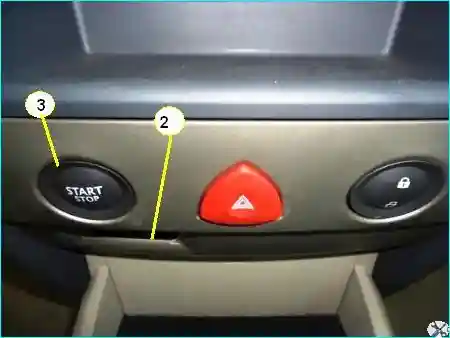
Fig. 1. Renault card reader
Renault card with «Hands-free» function
The card must be within the detection zone, which includes the passenger compartment and the boot, except for certain areas in the upper part, such as the sun visor, etc.
Starting conditions
Follow the engine starting instructions displayed on the instrument panel.
To start the engine, press the brake pedal (automatic transmission) or the clutch pedal (manual transmission).
The pedal must be held down throughout the starting procedure.
Press the button (3).
Vehicles with automatic transmission
After moving the gear selector to position «K» or «P», press the brake pedal.
The pedal must be held down throughout the starting procedure.
Note.
If one of the engine starting conditions is not met, the message «Release clutch + Start button» or «Press brake + Start button» appears on the instrument panel.
In some cases, it is necessary to turn the steering wheel while pressing the start button (3) to unlock the steering column.
«Accessories» function
To use certain functions when the engine is stopped (audio system, navigation system, etc.), press only button (3).
Starting with the tailgate open (in «Hands-free» mode)
If you need to start the engine with the tailgate open, remove the cover and insert the card into the reader (2).
Stopping the engine
Conditions for switching off the engine
- the vehicle is stationary;
- on vehicles with automatic transmission, the gear selector is in position «N» or «P»;
- press button (3).
When the engine is stopped, the accessories (audio system, air conditioning, etc.) continue to operate.
When the driver's door is opened, the accessories are switched off.
Renault remote control card
When the card is inserted in the reader (2), pressing the engine start/stop button (Start/Stop) stops the engine.
If the card is not in the reader, the message «Confirm engine stop» appears on the instrument panel after the first press.
To confirm the engine stop, press button (3) twice more.
Renault card in «Hands-free» mode
When the card is inside the vehicle, pressing the engine start/stop button (3) stops the engine.
If the card is not within its operating range, the message «Confirm engine stop» appears on the instrument panel after the first press.
To confirm the engine stop, press the button twice more.
When leaving the vehicle, do not leave the Renault card inside, especially if a child (or animal) remains in the vehicle.
A child could accidentally start the engine or operate electrical equipment (e.g., power windows), which may result in injury (trapping of the neck, hand, fingers, etc.).
Never switch off the ignition before the vehicle has come to a complete stop, as when the engine is not running, the brake servo, power steering, etc., as well as the passive safety devices (airbags, seat belt pretensioners) cease to operate.