


The speed limiter is a device that allows you to set a maximum driving speed.
It can be useful, for example, when driving exclusively in the city or in areas where a speed limit is in force (motorway), etc.
This system can be used when the vehicle speed exceeds 30 km/h.
Controls
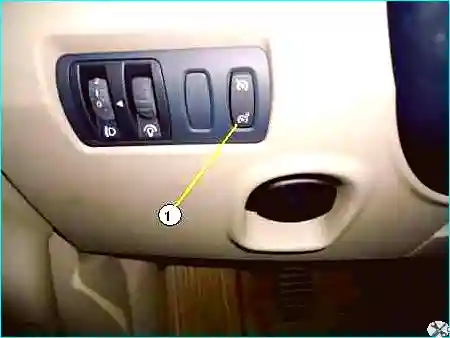
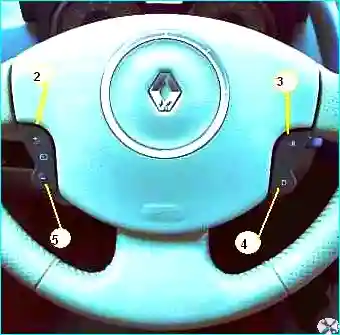
The main switch is located on the headlight beam height adjustment panel (Fig. 1), the other controls are shown in Fig. 2.
This orange warning lamp comes on in the instrument panel to indicate that the speed limiter is activated.
When the function is activated, the message «Limiter» and a dash appear in the instrument panel.
Driving with the speed limiter
When the speed limit value is stored in the system memory, driving the vehicle is no different from normal until the limit speed is reached.
Beyond this, any operation of the accelerator pedal will not allow the programmed maximum speed to be exceeded, except in emergency situations.
Activation by the driver:
Press the side switch (1) on the side marked with the symbol  .
.
The indicator lamp comes on in the instrument panel and, depending on the vehicle equipment, the on-board computer or matrix display switches to «Speed limitation» mode.
Activating speed limiter mode
At a constant speed (from 30 km/h), press the switch (2) on the steering wheel (see Fig. 2).
The speed value is stored in memory.
Changing the limit speed value:
The limit speed can be changed by successive brief presses or by holding down:
- button (2) to increase the speed;
- button (5) to decrease the speed.
Exceeding the programmed limit speed in an emergency
At any time, the programmed limit speed can be exceeded by pressing the accelerator pedal firmly to the floor (overcoming the resistance).
While the speed exceeds the programmed limit, the limit speed value is displayed on the instrument panel.
When the need for a higher speed ceases, release the accelerator pedal; as soon as the current speed drops below the previously set limit, the limiter immediately resumes operation.
Sometimes the limiter cannot maintain the programmed limit speed (for example, on a steep descent); the limit speed value flashes in the instrument panel.
Switching off the system
The speed limiter system is deactivated by pressing (see Fig. 2):
- button (4) — the speed value remains in memory, and the message «value stored» appears;
- button (1) — the speed value is not retained in memory, and the warning lamp goes out to confirm deactivation.
Recalling the stored limit speed
If a limit speed value has been stored, it can be recalled by holding down button (3) until the «Speed limiter» message appears.
Cruise control
If traffic conditions allow (for example, on open roads or motorways), the cruise control allows you to maintain a constant speed.
The cruise control can maintain any speed above 30 km/h.
The cruise control is operated using the buttons on the steering wheel (see Fig. 2).
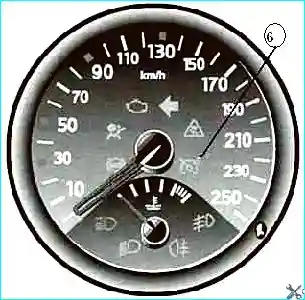
The green warning lamp (6, see Fig. 3) comes on in the instrument panel to indicate that the cruise control is activated.
When the cruise control is activated, the message «regulator» and a dash appear on the instrument panel display.
Activation
Press the side switch (1) on the side marked with the «Cruise control» symbol.
The indicator lamp comes on in the instrument panel and, depending on the equipment, the on-board computer switches to «Cruise control» mode.
Setting the speed while driving
At a constant speed (above 30 km/h) and with the appropriate gear engaged (for manual gearboxes), press button (2): the current speed is stored.
Once the speed is stored, you can release the accelerator pedal; the speed is then maintained automatically.
Changing the set speed
The maintained speed can be changed by several brief presses or one long press:
- on button (2) to increase the speed;
- on button (5) to decrease the speed.
Exceeding the set speed in an emergency
The set speed can be exceeded at any time by pressing the accelerator pedal.
As long as the current speed exceeds the set speed, the set speed value flashes in the instrument panel.
When the need to exceed the speed is over, release the accelerator pedal: the vehicle automatically returns to the set speed mode.
Sometimes it is impossible to maintain the set speed (for example, on a steep descent); the set speed value flashes in the instrument panel.
Switching off the system
The system is deactivated by:
- pressing the brake pedal;
- pressing the clutch pedal or moving the selector lever to neutral (for automatic transmissions);
- pressing button (4) — the set speed remains in memory;
- pressing button (1) — the speed remains in memory.
In the first three cases, the message «Value stored» appears in the instrument panel.
The warning lamp goes out to confirm that the system is deactivated.
Recalling the stored set speed
If a speed value has been stored, it can be recalled by pressing button (3) until the message «Cruise control» appears, provided the vehicle speed exceeds 30 km/h.
This additional system is designed to make driving easier.
However, this system does not replace the driver's skills, nor does it eliminate the need to comply with speed limits and safe driving rules.


