


Gear Selection
On models with automatic transmission, there is no need to constantly shift gears.
You only need to set the driving mode; the transmission will automatically select the selected mode.
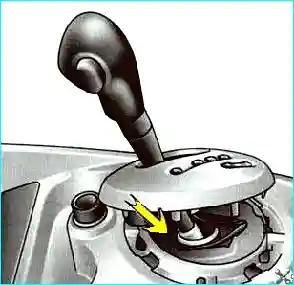
Mode shifting is performed using the selector lever (see Fig. 2).
The display (see Fig. 1) on the instrument cluster indicates the selected mode and the gear engaged.
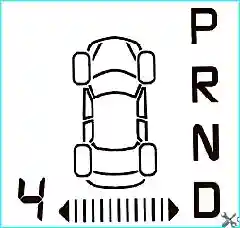
The following modes are available:
- P - Parking;
- R - Reverse;
- N - Neutral;
- D - Forward;
- 4 - Manually selected gear indicator.
Please note that the "P" mode is not designed to hold the vehicle when parked on a slope - always use the handbrake.
Starting Engine
Move the selector lever to the "P" or "N" position, turn on the ignition.
Press the brake pedal (the indicator lamp will go out) and move the selector lever from the "P" position to the desired mode.
Move the selector lever to the "D" or "R" position only when the vehicle is stationary.
The brake pedal must be pressed (otherwise the car will start moving immediately after engaging a gear), and the accelerator pedal must be released.
To move the selector lever from the "P" position, press the brake pedal and then press the release button on the selector handle.
Driving in automatic mode
Move the selector lever to the "D" position.
In most cases, you will no longer need to use the selector lever: gear shifting will occur automatically at the right moment and with optimal clarity. engine performance, as the control system takes into account the vehicle load, road profile, and the selected driving style.
Economical Driving
When driving under normal conditions, the selector lever should always be in the "D" position, keeping the accelerator pedal lightly depressed for automatic gear shifting at relatively low engine speeds.
Acceleration and Overtaking
Fastly press the accelerator pedal all the way to the floor (overcoming resistance to pedal movement).
This will cause the transmission to shift to the optimal lower gear for faster acceleration.
Driving in Manual Mode
This mode provides forced gear shifting limitation required based on road conditions (icy roads, variable terrain, driving with a load uphill, etc.).
Set the selector lever to the "D" position, then move the lever to the left.
You can shift gears manually by successively moving the selector lever:
- - to shift down, move the selector lever back;
- - to shift up, move the selector lever forward.
The engaged gear is displayed on the instrument cluster display.
Special Driving Conditions
Under certain driving conditions (e.g., when the engine overload protection system, ESP, etc. are operating), the automatic transmission may automatically engage the required gear.
Furthermore, to avoid "false shifts," the automatic transmission may refuse to shift gears; In this case, the gear indicator will flash for a few seconds.
If the road profile and its contour do not allow driving in automatic mode (for example, in the mountains), we recommend switching to manual gear shifting mode.
This is necessary to avoid sequential gear changes imposed by the automatic system on inclines and to ensure engine braking on long descents.
In very cold weather, to avoid stalling the engine, wait a while before moving the selector from position "P" or "N" to position "D" or "R".
If the vehicle is not equipped with ASR: on slippery roads or on roads whose surface does not provide reliable traction, to prevent slippage, switch to manual gear shifting mode and engage second gear when starting off.
Stopping the vehicle
After the vehicle has come to a complete stop, keep your foot on the brake pedal and move the selector to position "P", In this case, the gearbox will be in neutral, and the drive wheels will be mechanically locked by the transmission.
It should be noted that the "P" mode is not intended for holding the vehicle when parked When driving on a slope, always use the handbrake.
Faults
The appearance of the "Check gearbox" message while driving and the illumination of the service indicator light on the instrument panel indicate a malfunction.
If the "Gearbox overheating" message appears while driving and the service indicator light on the instrument panel comes on, avoid leaving the selector in the "D" (or "R") position as much as driving conditions allow.
When stopped, always return it to the "N" position.
In case of any faults, contact a Renault service center as soon as possible.
Towing a faulty vehicle with an automatic transmission.
When starting off, if the selector is locked in the "P" position with the brake pedal depressed, it is possible to release the selector manually.
To do this, detach the upper part of the cover at the base selector.
Simultaneously press the mark on the case and the unlock button on the selector.


